
HCI
HW2 · From vision to interaction
Source-checked response · personal review pendingHW2 / Lectures 4–6 / 15 points
How do ideas about future interfaces become interactions people can actually use?
About this draft. Prepared with AI assistance from the primary sources linked below, rechecked on 29 October 2026. This is a literature-based analysis, not a report of personal headset use or an independently conducted experiment. Conclusions and suggested tests are editorial analysis. The student should read the assigned paper and review the arguments before submission.
01 · A current HCI researcher — 5 points
Chris Harrison · Carnegie Mellon University
Goal. Identify an active researcher and explain recent projects, rather than write a biography of a historical pioneer.
Chris Harrison directs Carnegie Mellon’s Future Interfaces Group. CMU announced his election to the 2026 CHI Academy, which recognises substantial contributions to human–computer interaction. This is a defensible reason to choose him; it does not establish a universal ranking of HCI researchers. His current sensing and interaction work also connects directly to this assignment. CMU announcement.
The following projects were published at CHI 2026. They are team contributions, not inventions attributed to Harrison alone.
HiFiGaze · Helping a camera estimate where someone looks
Goal. Improve gaze estimation using cameras in consumer devices.
Analysis. Taejun Kim, Vimal Mollyn, Riku Arakawa and Chris Harrison use the reflection of a screen in the user’s eyes, together with knowledge of what the screen is displaying. The team reports an 18% reduction in mean tracking error against its appearance-based baseline. This is a relative improvement in the reported study, not “98% accuracy” or proof that every laptop can replace dedicated eye-tracking hardware. Project and paper.
The HCI significance is the possibility of another way to point at interface elements. Better sensing alone does not settle the interaction design: a system must still distinguish looking from intending to select. For practical deployment, tests across lighting, eyewear, head movement and different users would be valuable. Those are evaluation questions here, not reported defects in the project.
SoundBubble · Listening near the fingers without a finger microphone
Goal. Sense subtle hand interactions while keeping the hands free of an attached microphone.
Analysis. Daehwa Kim and Chris Harrison use a headset/glasses microphone array and beamforming to focus on sound near the fingers as they move. Their project demonstrates sensing small contact sounds, including finger motion across surfaces and skin-to-skin microgestures. Project and paper.
This suggests a way to make small physical gestures available as computer input. It also creates design questions: which gesture should perform which action, how should the system confirm recognition, and how should it recover from a mistaken interpretation? Robustness in noisy shared environments and understandable microphone controls would matter in a usable product. A research demonstration is evidence of feasibility, not evidence of broad commercial adoption.
Why these projects belong in HCI
Both projects connect sensing to human action: the eyes provide a possible pointing signal, while hand sounds provide possible gesture signals. The important question is not only whether a signal can be detected, but whether people can use it intentionally, comfortably and reliably. Neither project is presented here as an Apple implementation or as a component known to be inside Vision Pro.
02 · Reading The Ultimate Display — 5 points
Goal. Compare Sutherland’s 1965 ideas with documented present-day technology and discuss remaining possibilities.
Read The Ultimate Display. Page references below use this three-page transcription; its 2003 print footer is not the paper’s publication year.
Eye-based control: a concrete present-day comparison
On page 2, Sutherland considers interpreting eye movement as input and adapting a display to where someone looks. Vision Pro offers a relevant comparison: Apple’s instructions describe looking at an item and tapping the thumb and index finger together to select it. Apple’s gesture guide.
Analysis. This supports a specific connection between the early idea and a contemporary interaction. Gaze identifies a target; the hand supplies confirmation. It does not establish that Apple copied this paper or that gaze alone can replace every input method.
Feeling a virtual world: progress is not the same as completion
Sutherland also discusses computer-controlled forces and ends with a speculative room whose displayed objects have physical effects, including a chair that supports a person. The paper mixes existing demonstrations with future possibilities; its discussion of pointing and dragging on page 1 should not all be labelled prediction. Assigned paper, pages 1–3.
Analysis. A useful present-day research comparison is FIG’s Kinethreads, a 2025 soft haptic exosuit using motor-pulley mechanisms. It demonstrates a concrete route to body-level force effects. Project. A wearable that applies forces is still a different mechanism from generating arbitrary load-bearing objects in an empty room. A visually convincing chair also does not, by itself, support body weight.
Future assessment. Task-specific combinations of tracking, physical props and wearable feedback seem more plausible than one universal system that reproduces every sensation. A useful test would ask whether a particular task becomes easier or more understandable, rather than whether a demonstration merely looks realistic. This is a reasoned hypothesis, not a prediction of a release date.
03 · An input technique — 5 points
Apple Vision Pro: gaze to target, pinch to confirm
Goal. Select an interface item without holding a mouse or controller. The case is the specific gaze-and-pinch technique, not a review of Apple’s entire product range. It is a contemporary commercial example, not a claim that the technique was invented in 2026.
Classification. Vision Pro is a system with both input and output components. Eye and hand tracking provide input; its displays provide visual output. Gaze-and-pinch is a multimodal selection technique used within a spatial interface. “Multimodal” means combining more than one input channel, here eyes and hands.
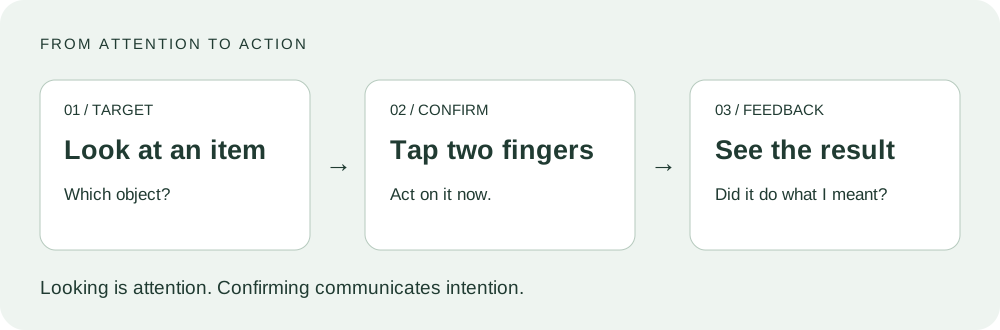
Analysis. Looking at a target gives the system a direction; the finger action communicates a decision. Separating these signals addresses an important ambiguity: visual attention does not necessarily mean intention to activate. This is the design rationale inferred here, not a measured error reduction.
Apple advises keeping the hands visible and describes conditions that can affect tracking, including gloves and significant hand covering. It also says many gestures can be performed with the hand resting on a desk or in the lap. Therefore, a fair critique should not assume that every action requires raising the arms. Apple’s gesture guide.
Potential strengths are the absence of a handheld pointer and the ability to select a visible item with a small gesture. Potential costs include uncertainty about the current target, tracking interruptions and the effort of repeated selection. An interaction suitable for opening an app is not automatically suitable for typing an essay or precise drawing.
Redesign. A design proposal would make target feedback unmistakable, show a brief confirmation after activation, and provide a clear recovery path after an incorrect selection. When tracking is unavailable, the interface should explain what is missing and expose an appropriate alternative. These are proposed requirements, not claims that all such features are absent from visionOS.
Prospects. The technique is promising for discrete selection within spatial computing. Wider success depends on task fit, recognition reliability, comfort, accessibility and application value. Shipping a product demonstrates availability; it does not establish universal usability or commercial success.
Proposed evaluation. Compare the same selection tasks using gaze-and-pinch and a suitable alternative. Vary target size and separation, and record completion time, incorrect activations, recovery time and reported effort. No participants have been tested for this draft.
Further reading and review
- Interface notes: Codex, ChatGPT, Claude, Douyin and Xiaohongshu — an optional comparison outside the three required HW2 answers.
- Review the source descriptions and replace any argument you do not agree with or cannot explain.
- The titles and analysis structure are editorial choices, not instructor-prescribed headings.
- Assignment requirements: HW2.pdf, page 1; course context: HCI_Lectures_notes.pdf, pages 94–165.
Paired practical work
The Lab 2 journal now records an actual Gaussian-model import and Windows rendering run. It connects to the reading response above: producing a convincing visual scene does not automatically provide physical feedback, collision surfaces or a usable interaction. This is a comparison developed for the coursework, not a finding from a participant study.